
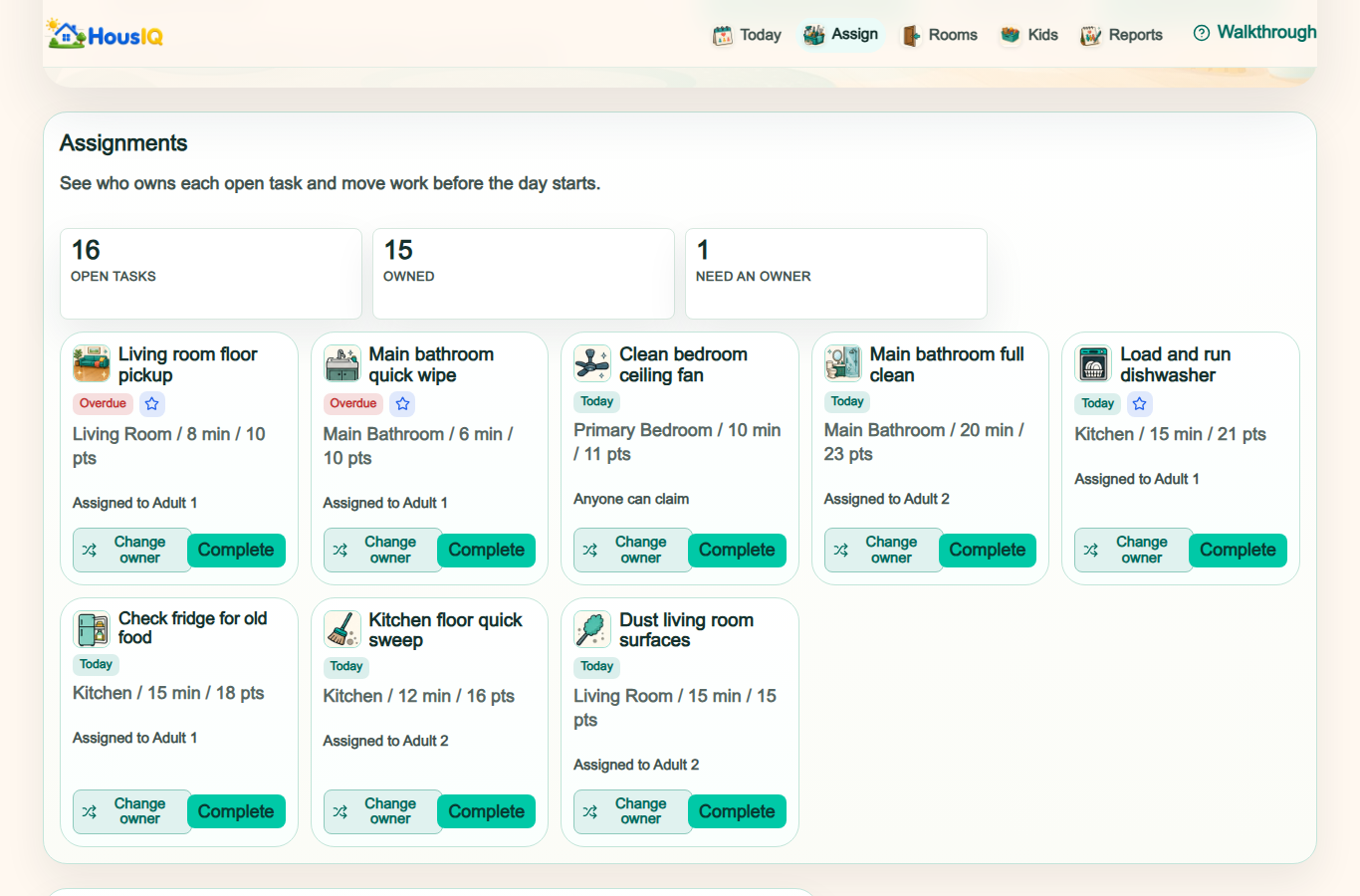
Most families do not need another list. They need the same work to stop falling back to the same person. The right app depends on whether your household needs cleaning guidance, family scheduling, game-like motivation, flexible tasks, or a clearer view of who owns recurring work. HousIQ publishes this guide and is one of the five products compared.
How we compared these family chore apps
We checked each company's official product or help page and compared five practical questions: what the app is built around, how recurring chores work, how people share the work, what children or other members see, and what a household should test before choosing. HousIQ publishes this guide, so its platform limitation is stated directly alongside the other tradeoffs.
Compare 5 family chore apps
HousIQ
- Start here when
- The same person keeps noticing, assigning, and finishing recurring work.
- How it approaches the work
- Connects Today, recurring chores, rooms, routines, member views, and workload review.
- Check before you choose
- HousIQ has an Android app and a full web app, but no native iPhone app. iPhone and iPad households should test the Safari web app first.
Sweepy
- Start here when
- Your main goal is a motivating cleaning schedule for everyone at home.
- How it approaches the work
- Uses visual cleanliness, generated cleaning lists, points, approvals, and a family leaderboard.
- Check before you choose
- Its strongest tools center on cleaning and game-like motivation. Check whether that covers the non-cleaning responsibilities your household also needs to share.
Tody
- Start here when
- You want guidance on what needs cleaning next instead of fixed calendar dates.
- How it approaches the work
- Prioritizes cleaning by need and supports visual status, timers, assignments, and rotations.
- Check before you choose
- Household synchronization is a Premium feature. Check whether need-based cleaning fits the fixed routines your household also uses.
Cozi
- Start here when
- Chores need to sit beside the family calendar, lists, meals, and shopping.
- How it approaches the work
- Gives family members chore lists with daily or weekly recurrence in its mobile apps.
- Check before you choose
- Its official Chores guide documents daily and weekly recurrence. Check whether those options cover the way your household repeats work.
Todoist
- Start here when
- Your family wants a flexible task tool and is willing to build its own household structure.
- How it approaches the work
- Offers recurring dates, shared projects, assigned tasks, Today views, and filters.
- Check before you choose
- People in a shared project can edit its tasks and information, and the household structure is yours to build. Decide whether that flexibility is useful or extra setup.
Create your household and see whether personal, shared, and recurring work stays clear. No card and no automatic charge.
Start freeHousIQ: recurring ownership and workload review
HousIQ connects today's tasks, recurring chores, rooms, routines, member-specific views, and workload reports. It is designed for households that need more than a shared checklist: each task should have a clear owner, personal tasks should stay on that person's Today page, and repeating work should remain reviewable over time. It works in a browser on phones, tablets, and computers, with an Android app available through Google Play.
Sweepy: game-like cleaning schedules
Sweepy uses visual cleanliness indicators and can generate a daily cleaning schedule based on how much effort you want to spend. Its public feature list also emphasizes points, a family leaderboard, household sharing, and parent approval for children's completed tasks. That makes it a practical choice when the main goal is turning room cleaning into a motivating game rather than managing every kind of household responsibility.
Tody: need-based cleaning routines
Tody organizes cleaning around indicators of actual need instead of requiring every task to land on a fixed date. It offers a prioritized task list, visual status, a focus timer, assignments, rotations, and household participation. Tody is worth testing when your family wants the app to guide what needs attention next and prefers a flexible cleaning rhythm over a calendar-heavy routine.
Cozi: chores beside the family calendar
Cozi is a broader family organizer with calendars, shopping lists, to-do lists, and chores. Cozi Chores gives each family member a chore list and supports daily or weekly recurrence in a shared view. It is a sensible choice when appointments, meals, lists, and family scheduling are the center of the system and chores are one part of that larger family organizer.
Todoist: flexible general-purpose task management
Todoist supports recurring due dates, Today and Upcoming views, projects, filters, and shared workspaces. Families can build shared chore projects and assign repeating tasks, but the product is intentionally general purpose. It fits households that already like flexible task software and do not mind designing their own room structure, child views, fairness rules, and household reporting.
Choose the app by the problem you need to solve
Start with the source of friction. Choose a cleaning-first app when the biggest question is what to clean next. Choose a family organizer when chores need to live beside calendars and shopping lists. Choose a general task manager when flexibility matters more than household-specific guidance. Choose HousIQ when recurring chores, ownership, rooms, routines, and uneven workload need to stay connected.
Test recurring tasks before you commit
Create one daily reset, one weekly room task, one monthly maintenance task, and one task that repeats on a custom interval. Complete each task once and confirm that the next occurrence appears correctly. Then change the owner and due time. A polished first screen matters, but recurrence behavior determines whether the app remains useful after the first week.
Check what each household member can see
Sign in or preview the app as two different people. A personal task should not appear on another person's Today page. A task assigned to everyone should say that clearly. Shared tasks should explain whether everyone completes them, one person can claim them, or the task rotates. This simple test exposes ambiguity that screenshots and feature lists rarely show.
Look beyond points and completion streaks
Points can help with motivation, especially for children, but they do not automatically make a workload fair. Check whether the app can show repeated misses, overdue work, unowned tasks, and the share carried by each person. A useful family chore app should help the household adjust the system instead of only rewarding whoever already completes the most tasks.
Review platform fit, privacy, and price
Confirm that every person can use the app on the devices they already have. Check whether the web version is complete, whether Android and iPhone access differ, how household data is shared, and whether useful family features require a paid plan. Product features and prices can change, so verify the current store listing and official product page before starting a subscription.
Questions families ask before choosing
What should a family chore app show each person?
Each person should be able to find their own work without searching through everyone else's list. Personal chores should stay with the assigned person, work assigned to everyone should say that clearly, and claimable chores should explain who can take them.
Can adults use a family chore app without children?
Yes. Couples, roommates, and other shared households still need clear recurring responsibility. Look for flexible member roles, personal views, shared chores, and a way to review work that repeatedly falls back to the same person.
Should a family chore app use points or workload review?
Points can make chores more motivating, especially for children. Workload review answers a different question: whether the same person keeps carrying the plan and completing the work. Choose the approach that matches the problem in your household.
How should we test a chore app before paying?
Add a daily chore, a weekly chore, a custom recurring chore, and one shared task. Use the app as two household members, complete the work once, and confirm that the next occurrence and assigned-person views are correct.